> ## Documentation Index
> Fetch the complete documentation index at: https://docs.adoraone.com/llms.txt
> Use this file to discover all available pages before exploring further.
# Families
> Organize households, neighborhoods, maturity levels, and family mentorships.
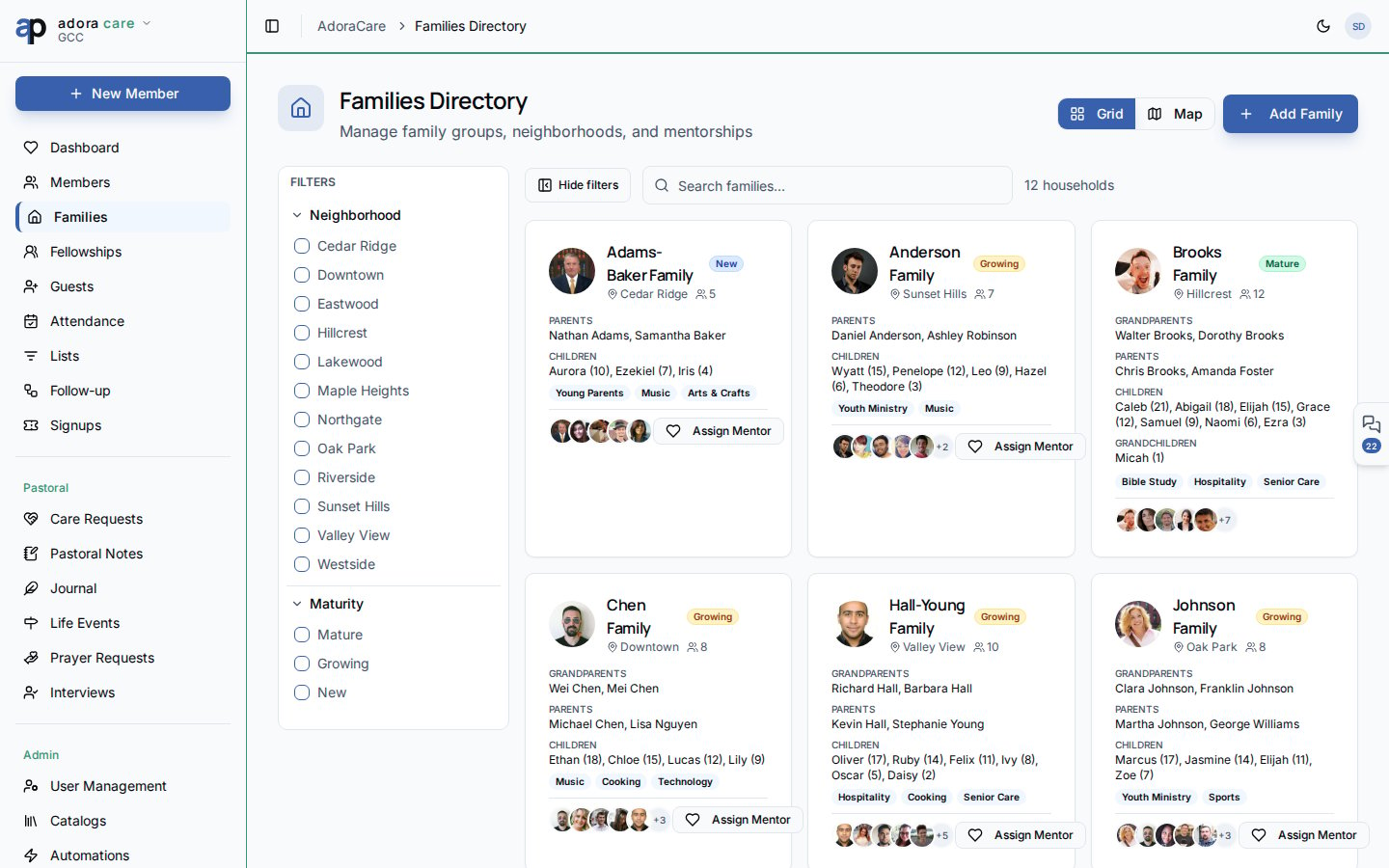
**Families** groups members into households so care teams see the whole picture — who lives together, where they are in the community, and which families are mentoring others.
 ## Quick Start
1. Open **Care → Families**.
2. Browse the **Grid** or switch to **Map** to see geographic clusters.
3. Filter by **Neighborhood** or **Maturity** (New, Growing, Mature).
4. Click **Add Family** to create a household and assign members.
5. Open a family card to edit relationships, mentorships, and notes.
***
## How-to Guide
### Grid and map views
| View | Best for |
| -------- | ----------------------------------------------------------------- |
| **Grid** | Scanning household cards with member counts and mentorship badges |
| **Map** | Visualizing families by address when location data is present |
Use the side **Filters** panel (or mobile sheet) to combine neighborhood and maturity filters. Active filter chips appear above the results.
### Family card details
Each family record includes:
* **Household name** and optional photo
* **Members** with roles (Head, Spouse, Child, etc.)
* **Neighborhood** tag for regional care teams
* **Maturity level** for discipleship tracking
* **Mentorship** links — families mentoring or being mentored
### Mentorship connections
From a family detail page, use **Mentor Family** to link an experienced household with one that is newer in the community. Mentorship counts appear on list cards so coordinators spot gaps quickly.
Click **Add Family**, name the household, and set neighborhood / maturity if you use those fields.
Attach existing **Members** with household roles. Mark a **Primary contact** for outreach.
Use **Mentor Family** to pair households for follow-up and accountability.
***
## Related
Individual profiles linked to family roles.
Small groups that often overlap with family life stages.
Members view their own household in the portal.
## Quick Start
1. Open **Care → Families**.
2. Browse the **Grid** or switch to **Map** to see geographic clusters.
3. Filter by **Neighborhood** or **Maturity** (New, Growing, Mature).
4. Click **Add Family** to create a household and assign members.
5. Open a family card to edit relationships, mentorships, and notes.
***
## How-to Guide
### Grid and map views
| View | Best for |
| -------- | ----------------------------------------------------------------- |
| **Grid** | Scanning household cards with member counts and mentorship badges |
| **Map** | Visualizing families by address when location data is present |
Use the side **Filters** panel (or mobile sheet) to combine neighborhood and maturity filters. Active filter chips appear above the results.
### Family card details
Each family record includes:
* **Household name** and optional photo
* **Members** with roles (Head, Spouse, Child, etc.)
* **Neighborhood** tag for regional care teams
* **Maturity level** for discipleship tracking
* **Mentorship** links — families mentoring or being mentored
### Mentorship connections
From a family detail page, use **Mentor Family** to link an experienced household with one that is newer in the community. Mentorship counts appear on list cards so coordinators spot gaps quickly.
Click **Add Family**, name the household, and set neighborhood / maturity if you use those fields.
Attach existing **Members** with household roles. Mark a **Primary contact** for outreach.
Use **Mentor Family** to pair households for follow-up and accountability.
***
## Related
Individual profiles linked to family roles.
Small groups that often overlap with family life stages.
Members view their own household in the portal.