> ## Documentation Index
> Fetch the complete documentation index at: https://docs.adoraone.com/llms.txt
> Use this file to discover all available pages before exploring further.
# Fellowships
> Manage small groups — rosters, meeting patterns, capacity, and geographic clusters.
**Fellowships** tracks small groups and ministry communities — who belongs, when they meet, whether the group is active, and how attendance trends over time.
 ## Quick Start
1. Open **Care → Fellowships**.
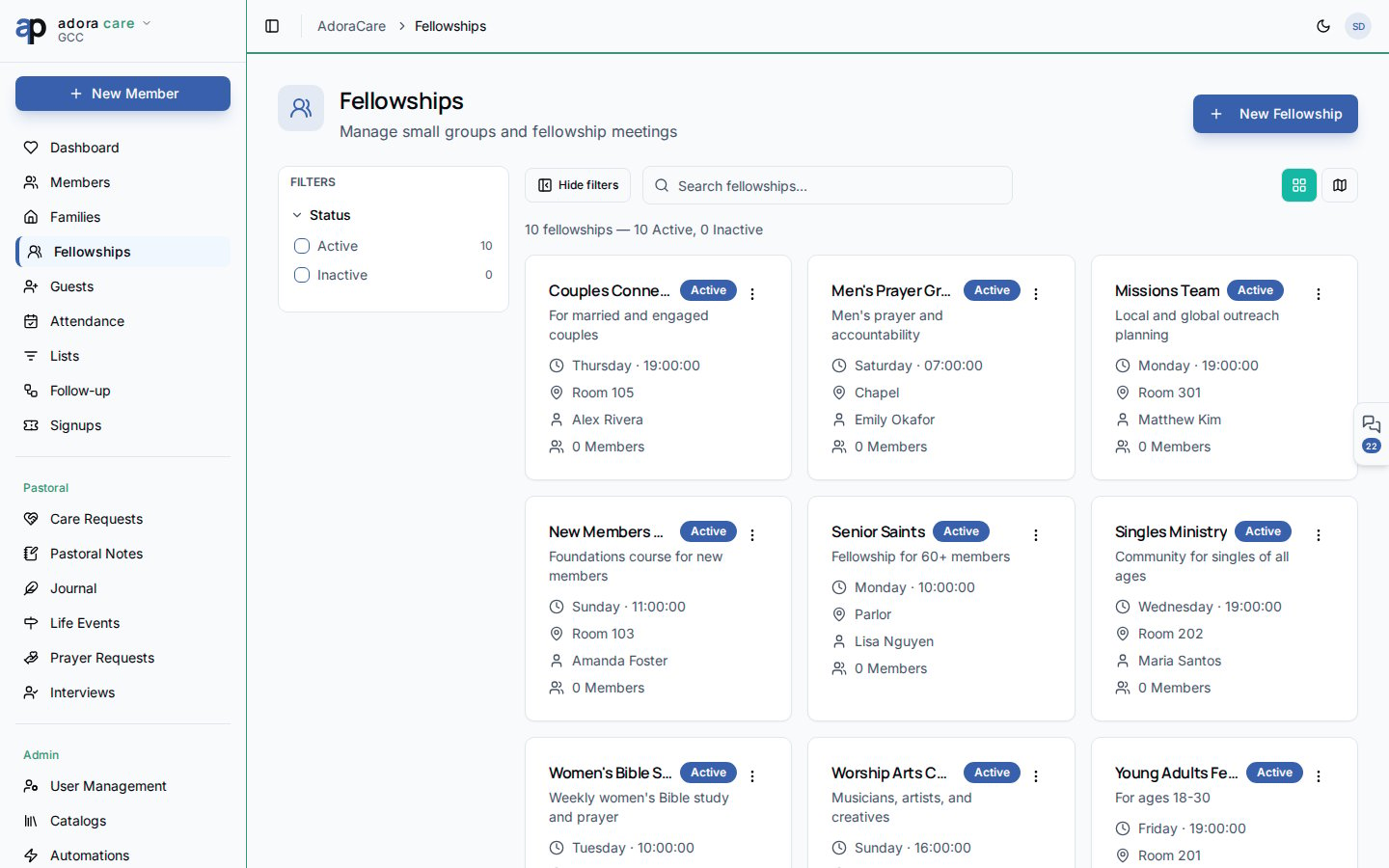
2. Search by name or filter **Active** / **Inactive** groups.
3. Toggle **Grid** or **Map** to browse visually.
4. Click **Create → Add Fellowship** to register a new group.
5. Open a fellowship to manage members, leaders, and meeting details.
***
## How-to Guide
### Fellowship list
The header summarizes total fellowships and active vs. inactive counts. Filters persist in the URL so you can share a filtered view with your team.
Each **Fellowship card** shows:
* Group name and description
* Leader(s) and member count
* Meeting rhythm (day, time, location when configured)
* Active / inactive status
### Fellowship detail
On the detail page you can:
* Add or remove **Members** and assign **Leader** roles
* Record meeting location for the **Map** view
* Mark a fellowship **Inactive** when it sunsets
* Review workflow indicators (e.g., attendance drop, capacity reached)
Fellowships connect to workflow triggers such as **member joined**, **leader absent**, and **visitor needs follow-up** — configure automations under **Care → Workflows**.
### Create a fellowship
**Create → Add Fellowship** and enter name, description, and meeting pattern.
Pick one or more leaders from your **Members** directory.
Add participants; member counts update on the grid and map views.
***
## Related
People records attached to fellowship rosters.
Household view complements small-group care.
Route new guests into fellowships after follow-up.
## Quick Start
1. Open **Care → Fellowships**.
2. Search by name or filter **Active** / **Inactive** groups.
3. Toggle **Grid** or **Map** to browse visually.
4. Click **Create → Add Fellowship** to register a new group.
5. Open a fellowship to manage members, leaders, and meeting details.
***
## How-to Guide
### Fellowship list
The header summarizes total fellowships and active vs. inactive counts. Filters persist in the URL so you can share a filtered view with your team.
Each **Fellowship card** shows:
* Group name and description
* Leader(s) and member count
* Meeting rhythm (day, time, location when configured)
* Active / inactive status
### Fellowship detail
On the detail page you can:
* Add or remove **Members** and assign **Leader** roles
* Record meeting location for the **Map** view
* Mark a fellowship **Inactive** when it sunsets
* Review workflow indicators (e.g., attendance drop, capacity reached)
Fellowships connect to workflow triggers such as **member joined**, **leader absent**, and **visitor needs follow-up** — configure automations under **Care → Workflows**.
### Create a fellowship
**Create → Add Fellowship** and enter name, description, and meeting pattern.
Pick one or more leaders from your **Members** directory.
Add participants; member counts update on the grid and map views.
***
## Related
People records attached to fellowship rosters.
Household view complements small-group care.
Route new guests into fellowships after follow-up.