> ## Documentation Index
> Fetch the complete documentation index at: https://docs.adoraone.com/llms.txt
> Use this file to discover all available pages before exploring further.
# Portal — Security
> Configure portal access, feature flags, directory privacy, and registration links.
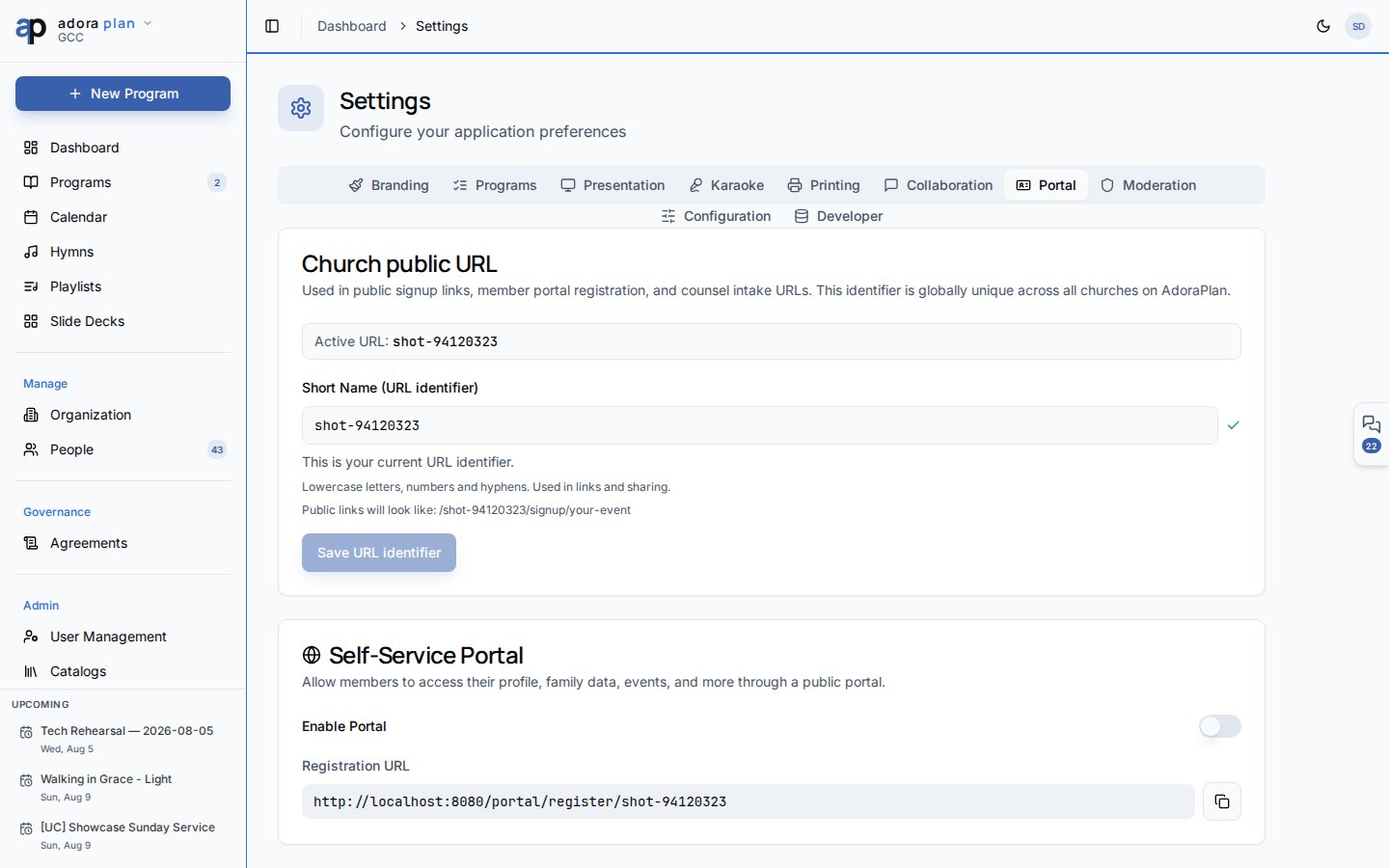
**Portal security** is managed from **Settings → Portal** — enable the portal, choose which modules members can use, control directory visibility fields, and distribute the visitor registration link.
 ## Quick Start
1. Open **Settings → Portal** (admin or moderator role required).
2. Turn on **Enable member portal** for your tenant.
3. Toggle individual features: Family, Events, Serving, Prayer, Directory.
4. Choose which fields appear in the member directory.
5. Copy the **Registration URL** and share it securely with guests.
***
## How-to Guide
### Access tokens
| Topic | Guidance |
| -------------- | ----------------------------------------------------------- |
| **Format** | Opaque UUID stored in `member_portal_tokens` |
| **Lifetime** | 90 days from issuance |
| **Delivery** | Email link after registration approval, or admin-generated |
| **Revocation** | Expired tokens fail validation; issue a new link |
| **Storage** | Browser `sessionStorage` — closing the tab ends the session |
There is no separate `/portal/security` page — members manage only their own **Profile** visibility (`show in directory`).
### Feature flags
Disable modules you are not ready to expose:
* **Family Management** — household read-only view
* **Event Registration** — attendance sign-up
* **Serving Schedule** — roster visibility
* **Prayer Requests** — submission form
* **Members Directory** — opt-in directory + prayer wall
Disabled features hide navigation items even if the token is valid.
### Directory privacy
Under **Directory fields**, choose what opted-in members may see about each other:
* Phone, email, address, member-since date
Members control participation with **Show in directory** on their portal profile. Staff should train members before enabling sensitive fields.
### Registration link safety
* The public URL includes only the church **short name** slug — not a secret.
* Email OTP verification prevents spam registrations.
* Admins must **approve** before a token is issued.
Platform admins configure church **short name** in **Organization** — required for `/portal/register/{slug}` links to resolve correctly.
***
## Related
End-user portal experience after login.
Public form that feeds approval workflow.
Other tenant configuration (branding, programs, etc.).
## Quick Start
1. Open **Settings → Portal** (admin or moderator role required).
2. Turn on **Enable member portal** for your tenant.
3. Toggle individual features: Family, Events, Serving, Prayer, Directory.
4. Choose which fields appear in the member directory.
5. Copy the **Registration URL** and share it securely with guests.
***
## How-to Guide
### Access tokens
| Topic | Guidance |
| -------------- | ----------------------------------------------------------- |
| **Format** | Opaque UUID stored in `member_portal_tokens` |
| **Lifetime** | 90 days from issuance |
| **Delivery** | Email link after registration approval, or admin-generated |
| **Revocation** | Expired tokens fail validation; issue a new link |
| **Storage** | Browser `sessionStorage` — closing the tab ends the session |
There is no separate `/portal/security` page — members manage only their own **Profile** visibility (`show in directory`).
### Feature flags
Disable modules you are not ready to expose:
* **Family Management** — household read-only view
* **Event Registration** — attendance sign-up
* **Serving Schedule** — roster visibility
* **Prayer Requests** — submission form
* **Members Directory** — opt-in directory + prayer wall
Disabled features hide navigation items even if the token is valid.
### Directory privacy
Under **Directory fields**, choose what opted-in members may see about each other:
* Phone, email, address, member-since date
Members control participation with **Show in directory** on their portal profile. Staff should train members before enabling sensitive fields.
### Registration link safety
* The public URL includes only the church **short name** slug — not a secret.
* Email OTP verification prevents spam registrations.
* Admins must **approve** before a token is issued.
Platform admins configure church **short name** in **Organization** — required for `/portal/register/{slug}` links to resolve correctly.
***
## Related
End-user portal experience after login.
Public form that feeds approval workflow.
Other tenant configuration (branding, programs, etc.).