> ## Documentation Index
> Fetch the complete documentation index at: https://docs.adoraone.com/llms.txt
> Use this file to discover all available pages before exploring further.
# AdoraCounsel Overview
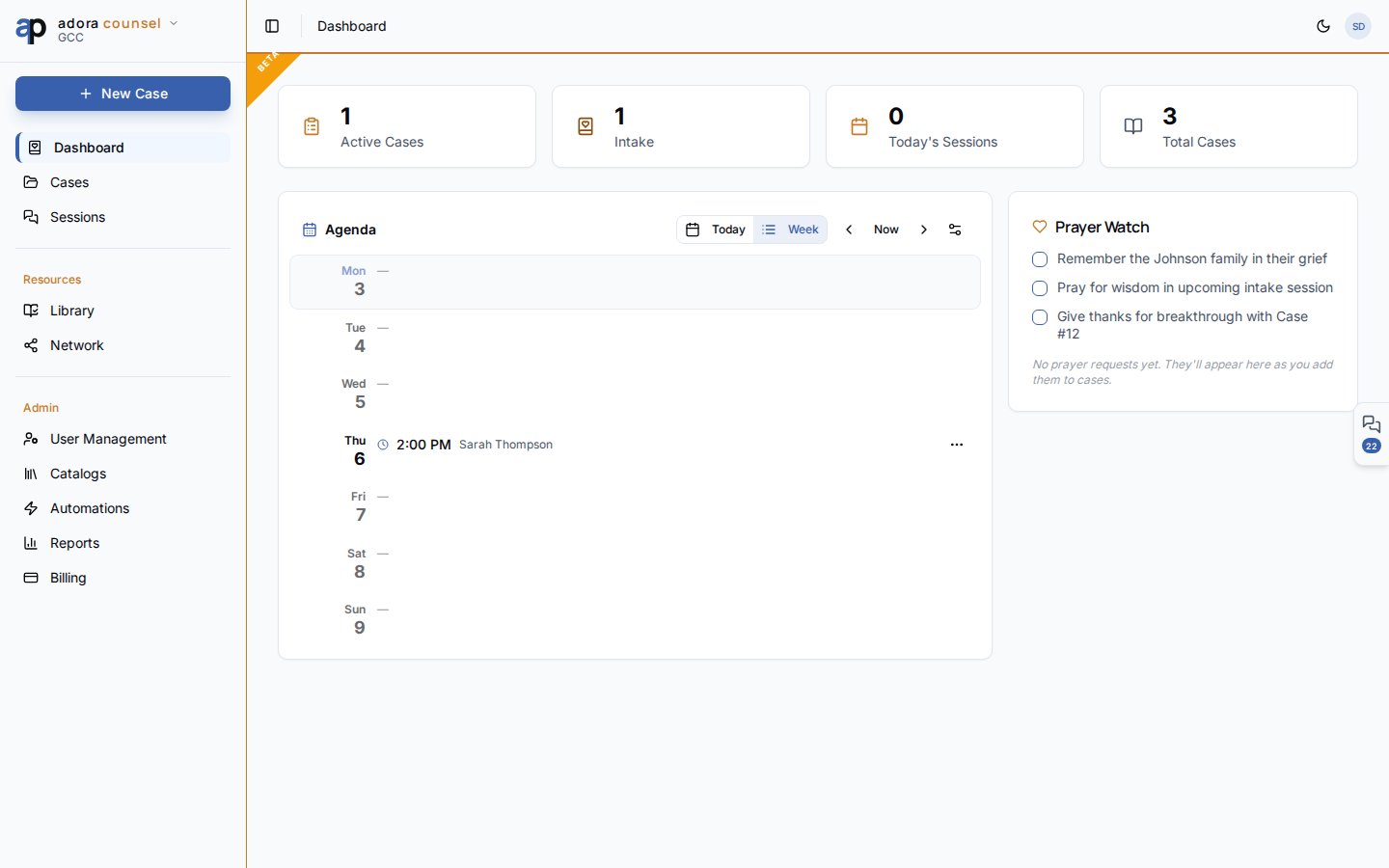
> Biblical counseling workspace — dashboard stats, counselor agenda, and prayer watch.
**AdoraCounsel** is Adora's confidential counseling module — manage cases, run session notes, collect public intake forms, and coordinate your week from a counselor-focused dashboard.
 ## Quick Start
1. Open **Counsel** in the product switcher (requires **AdoraCounsel** on your plan).
2. Review dashboard stats: **Active cases**, **Intake**, **Today's meetings**, **Total cases**.
3. Use the **Agenda** to see this week's sessions and availability.
4. Go to **Cases** to open or create a counseling case.
5. Run sessions from **Sessions** or jump in from a case detail page.
***
## How-to Guide
### Dashboard layout
| Section | Purpose |
| ---------------- | --------------------------------------------------------------- |
| **Stat cards** | Live counts from `counsel_cases` and today's `counsel_sessions` |
| **Agenda** | Week/today schedule, availability slots, session quick-open |
| **Prayer watch** | Personal checklist for cases on your heart (local UI) |
| **Trial banner** | Shown when AdoraCounsel is in trial mode |
The agenda is the same component documented in [Agenda](/en/adoracounsel/agenda) — it reads your **counselor profile** availability and scheduled sessions.
### Counselor profile
Before scheduling, ensure your user has a **counselor profile** on the tenant. The agenda and session assignment flows use this record for availability and ownership.
Cases can originate from **Care Requests** (handoff dialog), manual creation, or public **Intake** submissions reviewed under **Cases → Submissions**.
### Product boundaries
| Module | Use for |
| ------------------------------ | ------------------------------------------------ |
| **AdoraCounsel** | Formal counseling cases, session notes, homework |
| **AdoraCare — Pastoral Notes** | General visitation (not case files) |
| **AdoraCare — Care Requests** | Operational care tickets |
***
## Related
Case list, status workflow, and intake submissions.
Session desk with rich notes and homework.
Public pre-counseling questionnaire.
Articles, worksheets, and scripture maps.
## Quick Start
1. Open **Counsel** in the product switcher (requires **AdoraCounsel** on your plan).
2. Review dashboard stats: **Active cases**, **Intake**, **Today's meetings**, **Total cases**.
3. Use the **Agenda** to see this week's sessions and availability.
4. Go to **Cases** to open or create a counseling case.
5. Run sessions from **Sessions** or jump in from a case detail page.
***
## How-to Guide
### Dashboard layout
| Section | Purpose |
| ---------------- | --------------------------------------------------------------- |
| **Stat cards** | Live counts from `counsel_cases` and today's `counsel_sessions` |
| **Agenda** | Week/today schedule, availability slots, session quick-open |
| **Prayer watch** | Personal checklist for cases on your heart (local UI) |
| **Trial banner** | Shown when AdoraCounsel is in trial mode |
The agenda is the same component documented in [Agenda](/en/adoracounsel/agenda) — it reads your **counselor profile** availability and scheduled sessions.
### Counselor profile
Before scheduling, ensure your user has a **counselor profile** on the tenant. The agenda and session assignment flows use this record for availability and ownership.
Cases can originate from **Care Requests** (handoff dialog), manual creation, or public **Intake** submissions reviewed under **Cases → Submissions**.
### Product boundaries
| Module | Use for |
| ------------------------------ | ------------------------------------------------ |
| **AdoraCounsel** | Formal counseling cases, session notes, homework |
| **AdoraCare — Pastoral Notes** | General visitation (not case files) |
| **AdoraCare — Care Requests** | Operational care tickets |
***
## Related
Case list, status workflow, and intake submissions.
Session desk with rich notes and homework.
Public pre-counseling questionnaire.
Articles, worksheets, and scripture maps.