> ## Documentation Index
> Fetch the complete documentation index at: https://docs.adoraone.com/llms.txt
> Use this file to discover all available pages before exploring further.
# Sessions
> Schedule counseling meetings and capture confidential session notes, homework, and scripture.
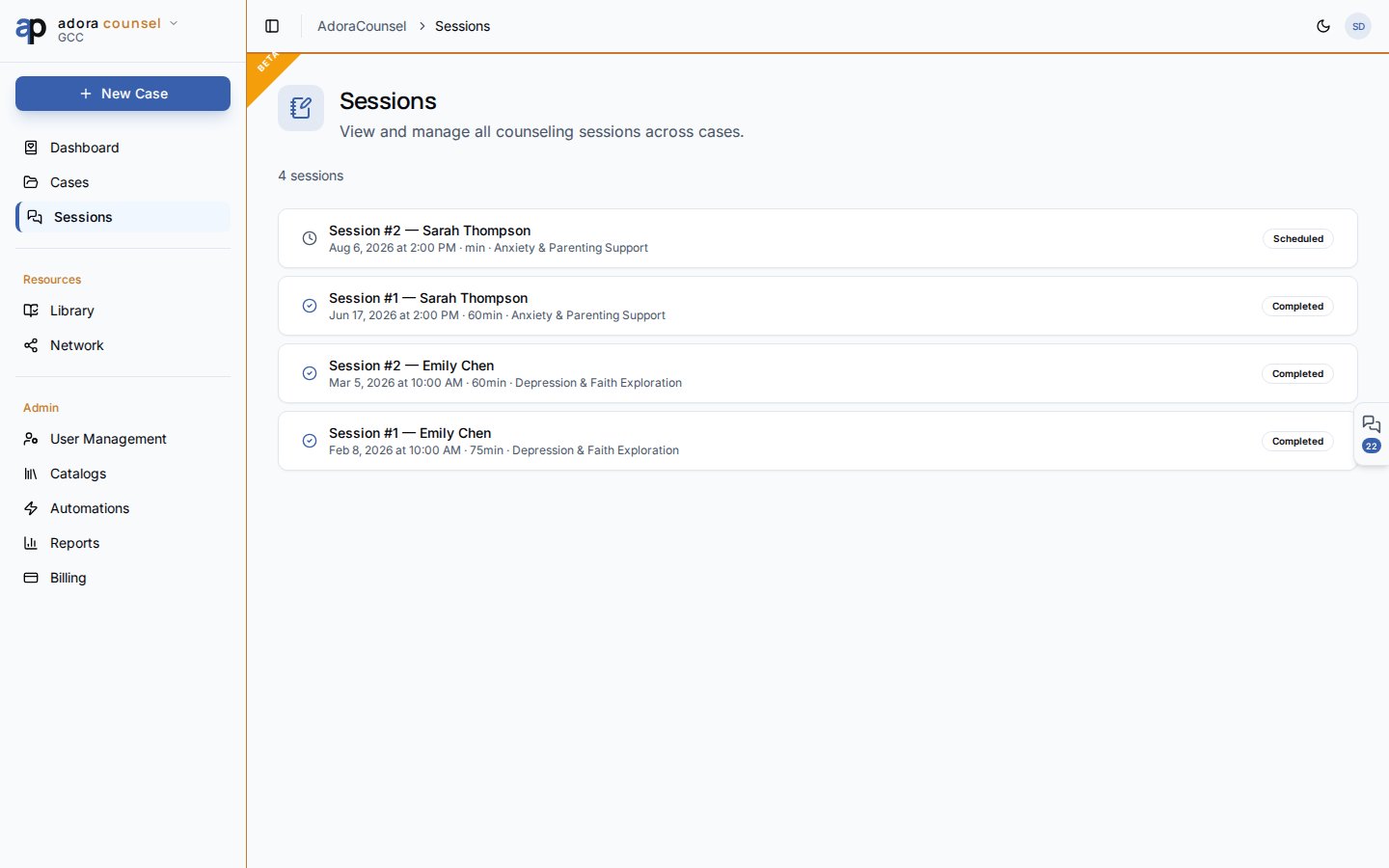
**Sessions** are individual counseling meetings — schedule them from a case, then use the **Session desk** to take rich notes, assign homework, and mark completion.
 ## Quick Start
1. Open **Counsel → Sessions** for a tenant-wide list (newest first).
2. Click a row to open the **Session desk**.
3. Or create sessions from **Cases → \[case] → New Session**.
4. Set status: Scheduled → In progress → Completed (or Cancelled / No show).
5. Save notes before marking **Completed**.
***
## How-to Guide
### Sessions list
Each row shows:
| Element | Description |
| --------------- | ------------------------------------------------------ |
| **Meeting #** | Session number within the case |
| **Counselee** | From linked case |
| **Date & time** | `scheduled_at` with duration |
| **Status** | Icon + badge (scheduled, in progress, completed, etc.) |
### Session desk
## Quick Start
1. Open **Counsel → Sessions** for a tenant-wide list (newest first).
2. Click a row to open the **Session desk**.
3. Or create sessions from **Cases → \[case] → New Session**.
4. Set status: Scheduled → In progress → Completed (or Cancelled / No show).
5. Save notes before marking **Completed**.
***
## How-to Guide
### Sessions list
Each row shows:
| Element | Description |
| --------------- | ------------------------------------------------------ |
| **Meeting #** | Session number within the case |
| **Counselee** | From linked case |
| **Date & time** | `scheduled_at` with duration |
| **Status** | Icon + badge (scheduled, in progress, completed, etc.) |
### Session desk
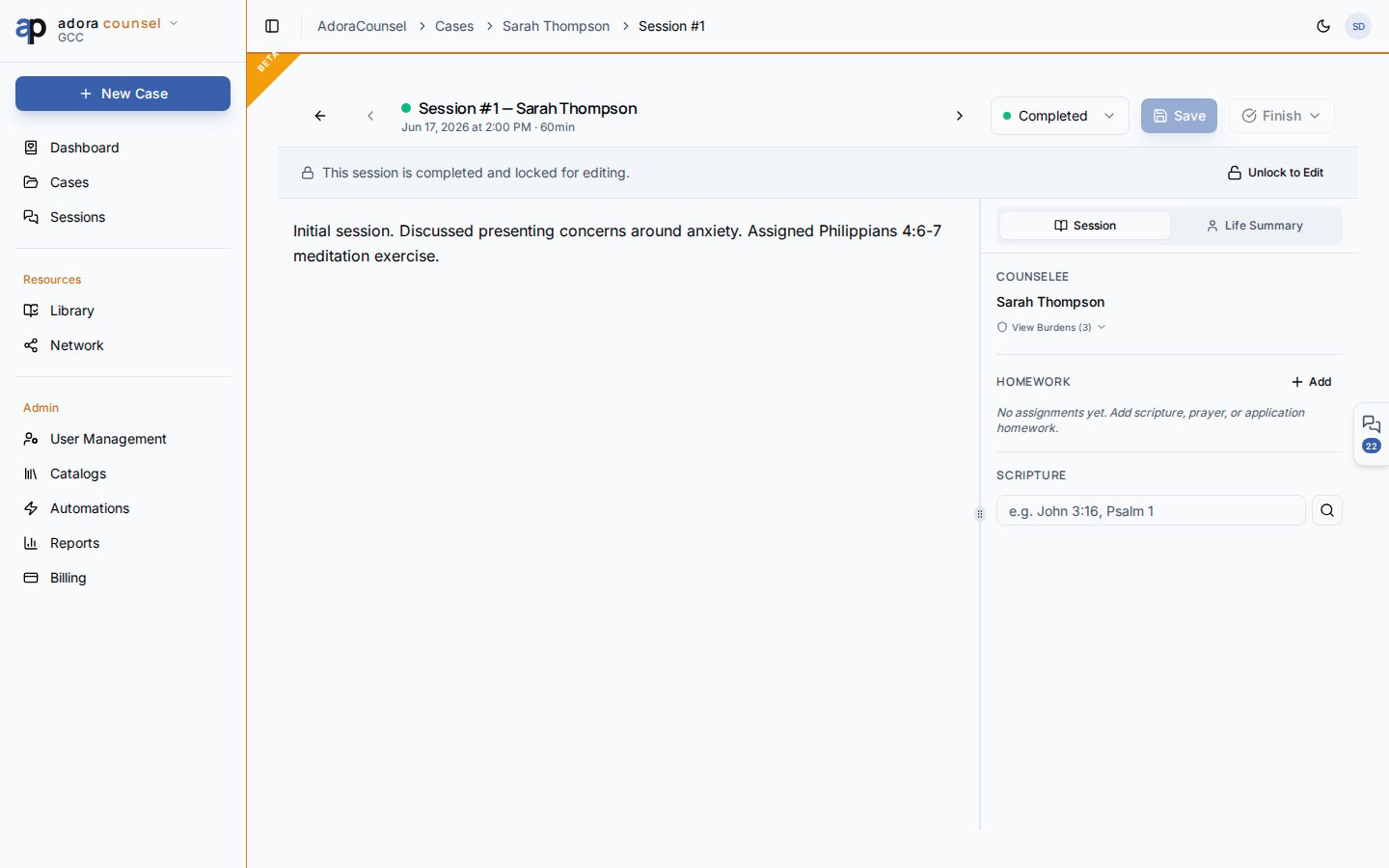 The desk is a split workspace:
| Panel | Tools |
| ------------- | ------------------------------------------------------- |
| **Notes** | Tiptap rich editor — headings, lists, quotes; auto-save |
| **Counselee** | Life summary, demographics, case context |
| **Homework** | Structured blocks counselors assign between meetings |
| **Scripture** | Search and insert passage references |
Use the header to change **status**, navigate sibling sessions, or schedule a follow-up.
Session notes are confidential counseling records — distinct from **Pastoral Notes** in AdoraCare. Access is limited to counselors and tenant admins per RLS.
### Session statuses
| Status | When to use |
| --------------- | ---------------------------------------- |
| **Scheduled** | Future appointment on the books |
| **In progress** | Meeting underway |
| **Completed** | Notes finalized; appears in case history |
| **Cancelled** | Meeting called off |
| **No show** | Counselee did not attend |
***
## Related
Parent case and counselee context.
Week view of upcoming sessions.
Pull worksheets into homework or share after sessions.
The desk is a split workspace:
| Panel | Tools |
| ------------- | ------------------------------------------------------- |
| **Notes** | Tiptap rich editor — headings, lists, quotes; auto-save |
| **Counselee** | Life summary, demographics, case context |
| **Homework** | Structured blocks counselors assign between meetings |
| **Scripture** | Search and insert passage references |
Use the header to change **status**, navigate sibling sessions, or schedule a follow-up.
Session notes are confidential counseling records — distinct from **Pastoral Notes** in AdoraCare. Access is limited to counselors and tenant admins per RLS.
### Session statuses
| Status | When to use |
| --------------- | ---------------------------------------- |
| **Scheduled** | Future appointment on the books |
| **In progress** | Meeting underway |
| **Completed** | Notes finalized; appears in case history |
| **Cancelled** | Meeting called off |
| **No show** | Counselee did not attend |
***
## Related
Parent case and counselee context.
Week view of upcoming sessions.
Pull worksheets into homework or share after sessions.