> ## Documentation Index
> Fetch the complete documentation index at: https://docs.adoraone.com/llms.txt
> Use this file to discover all available pages before exploring further.
# Dashboard
> Your signed-in home for the next service, team readiness, hymn rotation, and quick actions.
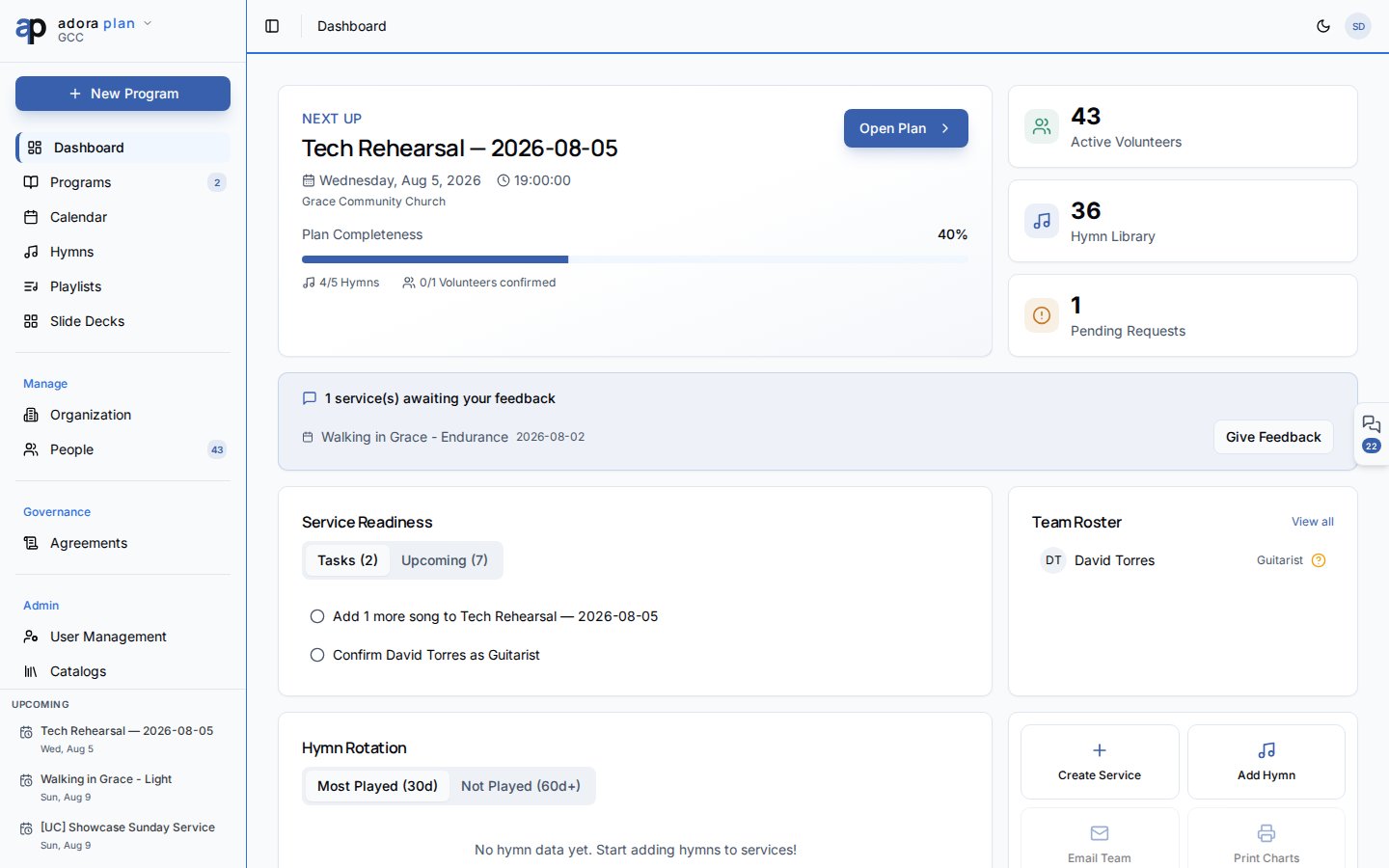
The **Dashboard** is your planning home. It surfaces your **Next Up** service, key metrics, outstanding tasks, team roster status, and hymn rotation health — so you can see what needs attention before Sunday.
 ## Quick Start
1. Sign in and open **Dashboard** in the sidebar.
2. Review **Next Up** — your nearest upcoming **Program**.
3. Click **Open Plan** to edit the service order, or **Create Service** if nothing is scheduled.
4. Check **Service Readiness** for open tasks and upcoming services.
5. Use **Quick Actions** to jump to **Create Service** or **Add Hymn**.
***
## How-to Guide
### Understand the Next Up hero
The top card shows your next upcoming **Program** with date, service type, and planning progress.
**Plan Completeness** shows hymns added and volunteers confirmed for that service.
Click **Open Plan** to go to the **Service Order** editor for that program.
If you see **No upcoming services**, click **Create Service** to start the program wizard.
### Use Service Readiness
The **Service Readiness** panel has two tabs:
* **Tasks** — outstanding planning tasks linked to upcoming programs.
* **Upcoming** — services in the next four weeks.
Click a task row to open the related **Program**.
### Monitor hymn rotation
**Hymn Rotation** helps you avoid repeating the same songs too often.
* **Most Played (30d)** — songs used frequently in the last month.
* **Not Played (60d+)** — songs that have not appeared recently (good candidates for upcoming services).
### Quick Actions
| Action | What it does |
| ------------------ | ---------------------------------------- |
| **Create Service** | Opens the new **Program** wizard |
| **Add Hymn** | Opens the **Hymn Library** to add a song |
New churches see a **Getting started** checklist and **Invite your worship team** card until onboarding steps are complete. Dismiss the checklist when you no longer need it.
***
## Related
Build and publish your order of service.
A guided tour of the Dashboard and sidebar.
Grow your song library before you plan.
See programs and events on a unified calendar.
## Quick Start
1. Sign in and open **Dashboard** in the sidebar.
2. Review **Next Up** — your nearest upcoming **Program**.
3. Click **Open Plan** to edit the service order, or **Create Service** if nothing is scheduled.
4. Check **Service Readiness** for open tasks and upcoming services.
5. Use **Quick Actions** to jump to **Create Service** or **Add Hymn**.
***
## How-to Guide
### Understand the Next Up hero
The top card shows your next upcoming **Program** with date, service type, and planning progress.
**Plan Completeness** shows hymns added and volunteers confirmed for that service.
Click **Open Plan** to go to the **Service Order** editor for that program.
If you see **No upcoming services**, click **Create Service** to start the program wizard.
### Use Service Readiness
The **Service Readiness** panel has two tabs:
* **Tasks** — outstanding planning tasks linked to upcoming programs.
* **Upcoming** — services in the next four weeks.
Click a task row to open the related **Program**.
### Monitor hymn rotation
**Hymn Rotation** helps you avoid repeating the same songs too often.
* **Most Played (30d)** — songs used frequently in the last month.
* **Not Played (60d+)** — songs that have not appeared recently (good candidates for upcoming services).
### Quick Actions
| Action | What it does |
| ------------------ | ---------------------------------------- |
| **Create Service** | Opens the new **Program** wizard |
| **Add Hymn** | Opens the **Hymn Library** to add a song |
New churches see a **Getting started** checklist and **Invite your worship team** card until onboarding steps are complete. Dismiss the checklist when you no longer need it.
***
## Related
Build and publish your order of service.
A guided tour of the Dashboard and sidebar.
Grow your song library before you plan.
See programs and events on a unified calendar.