> ## Documentation Index
> Fetch the complete documentation index at: https://docs.adoraone.com/llms.txt
> Use this file to discover all available pages before exploring further.
# Playlists
> Create song collections for worship, preview audio, and launch presentation mode.
**Playlists** are reusable song collections — curate sets for special services, rehearsal, or spontaneous worship, then **Play All** for audio preview or **Present** for lyric slides.
 ## Quick Start
1. Open **Playlists** in the sidebar.
2. Click **New Playlist**, enter a name, and choose **Public** or **Private** visibility.
3. Open the playlist and click **Add hymn** to pull songs from your library.
4. Drag rows to reorder tracks.
5. Click **Present** to launch [Presentation Mode](/en/adoraplan/presentation), or **Play All** to listen through attached audio.
***
## How-to Guide
### Playlists list
## Quick Start
1. Open **Playlists** in the sidebar.
2. Click **New Playlist**, enter a name, and choose **Public** or **Private** visibility.
3. Open the playlist and click **Add hymn** to pull songs from your library.
4. Drag rows to reorder tracks.
5. Click **Present** to launch [Presentation Mode](/en/adoraplan/presentation), or **Play All** to listen through attached audio.
***
## How-to Guide
### Playlists list
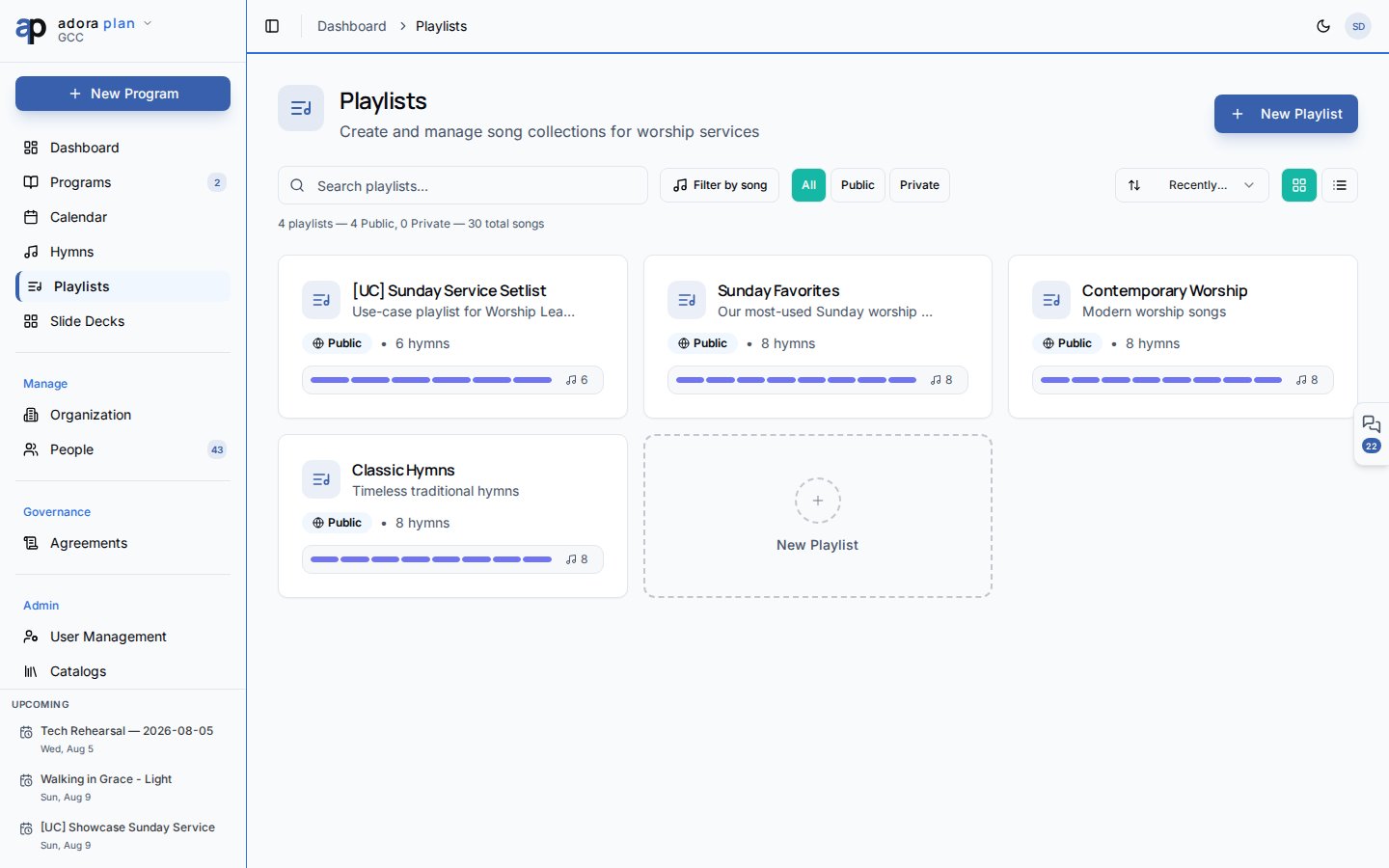
 Browse and manage all playlists:
| Tool | Purpose |
| ------------------ | ---------------------------------------------- |
| **Search** | Filter by name or description |
| **Filter by song** | Show only playlists containing a specific hymn |
| **Visibility** | All, Public, or Private |
| **Sort** | Recently updated, name, or most songs |
| **View** | Grid or list layout |
Each card shows song count, visibility badge, and last updated date. Click a playlist to open its detail page.
**Create / edit** fields:
* **Name** (required, up to 100 characters)
* **Description** (optional)
* **Public Playlist** — visible to all team members in your church when enabled
### Playlist detail
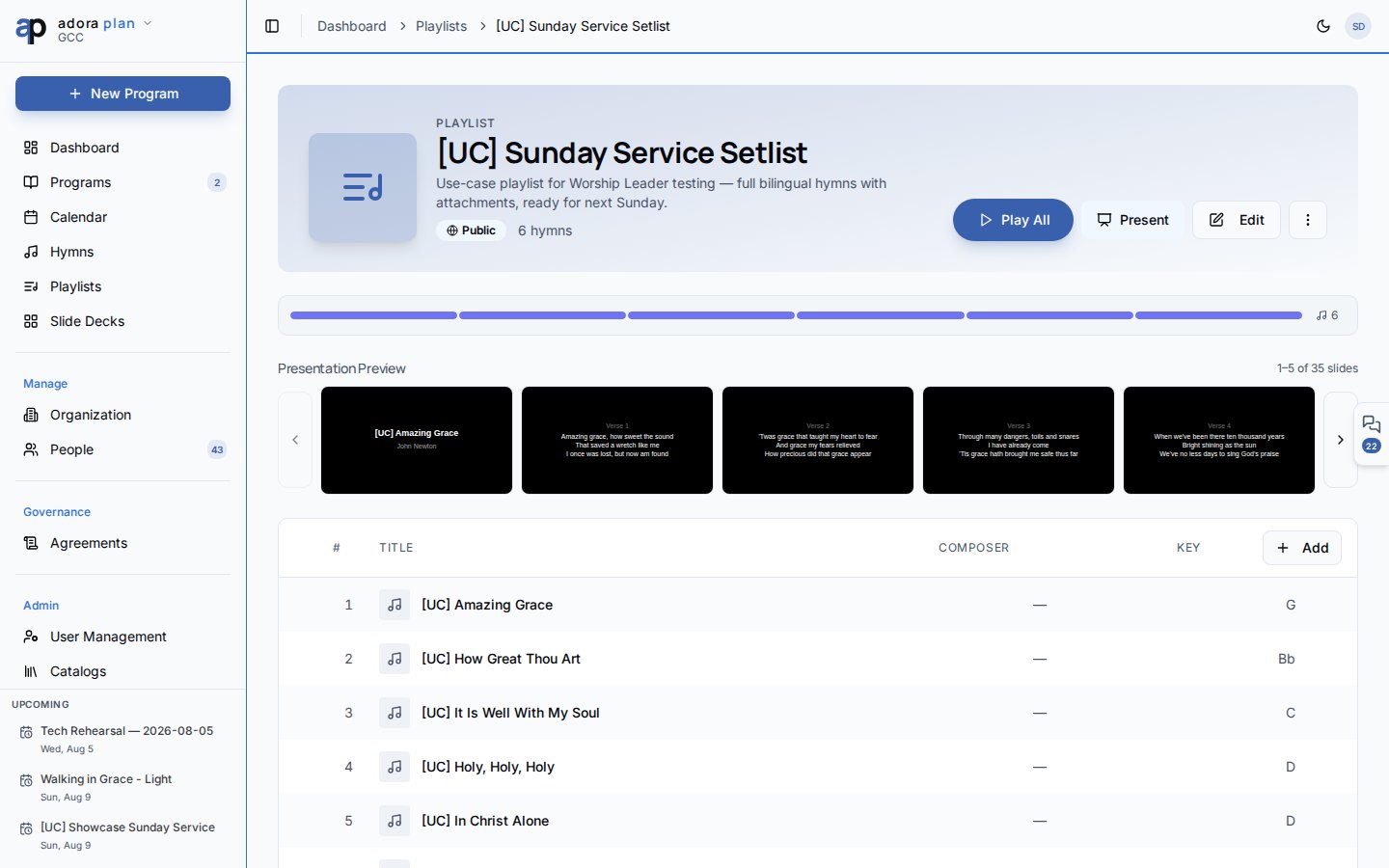
The detail page is your working view:
**Header actions:**
* **Play All** — queue every track that has audio files attached
* **Present** — open Presentation Mode with hymns in playlist order
* **Edit** — change name, description, visibility
* **More** → **Duplicate** or **Delete**
**Presentation Preview** — a filmstrip of generated slides. Click any slide to start presenting from that point.
**Hymn list** — drag-and-drop reorder, play a single track, remove songs, or **Add hymn** from the library.
A **change banner** appears when hymns in the playlist were edited since your last visit, so you know lyrics may have updated.
When a presentation including these songs is active, a **Currently Presenting** badge pulses on the playlist header.
### Public vs. private
| Visibility | Who sees it |
| ----------- | --------------------------------- |
| **Public** | All team members in your church |
| **Private** | Only you (and admins with access) |
Playlists are scoped to your church. Songs come from the shared **Hymns** library.
### Duplicate playlist
**Duplicate** copies the playlist name and settings with a “(Copy)” suffix. Song items are **not** copied — add hymns to the new playlist manually.
Adding a hymn to a playlist from the **Hymns** list page is planned; today, add songs from the playlist detail page.
Playlists and **Programs** are separate. A program’s service order does not sync with playlists — add the same songs to both manually when needed.
***
## Related
Project playlist lyrics to a projector.
Source library for playlist tracks.
Full service planning with roster and service order.
Control a playlist presentation from your phone.
Browse and manage all playlists:
| Tool | Purpose |
| ------------------ | ---------------------------------------------- |
| **Search** | Filter by name or description |
| **Filter by song** | Show only playlists containing a specific hymn |
| **Visibility** | All, Public, or Private |
| **Sort** | Recently updated, name, or most songs |
| **View** | Grid or list layout |
Each card shows song count, visibility badge, and last updated date. Click a playlist to open its detail page.
**Create / edit** fields:
* **Name** (required, up to 100 characters)
* **Description** (optional)
* **Public Playlist** — visible to all team members in your church when enabled
### Playlist detail
The detail page is your working view:
**Header actions:**
* **Play All** — queue every track that has audio files attached
* **Present** — open Presentation Mode with hymns in playlist order
* **Edit** — change name, description, visibility
* **More** → **Duplicate** or **Delete**
**Presentation Preview** — a filmstrip of generated slides. Click any slide to start presenting from that point.
**Hymn list** — drag-and-drop reorder, play a single track, remove songs, or **Add hymn** from the library.
A **change banner** appears when hymns in the playlist were edited since your last visit, so you know lyrics may have updated.
When a presentation including these songs is active, a **Currently Presenting** badge pulses on the playlist header.
### Public vs. private
| Visibility | Who sees it |
| ----------- | --------------------------------- |
| **Public** | All team members in your church |
| **Private** | Only you (and admins with access) |
Playlists are scoped to your church. Songs come from the shared **Hymns** library.
### Duplicate playlist
**Duplicate** copies the playlist name and settings with a “(Copy)” suffix. Song items are **not** copied — add hymns to the new playlist manually.
Adding a hymn to a playlist from the **Hymns** list page is planned; today, add songs from the playlist detail page.
Playlists and **Programs** are separate. A program’s service order does not sync with playlists — add the same songs to both manually when needed.
***
## Related
Project playlist lyrics to a projector.
Source library for playlist tracks.
Full service planning with roster and service order.
Control a playlist presentation from your phone.