> ## Documentation Index
> Fetch the complete documentation index at: https://docs.adoraone.com/llms.txt
> Use this file to discover all available pages before exploring further.
# Reports
> Run analytics, track attendance, review compliance, and build saved people lists.
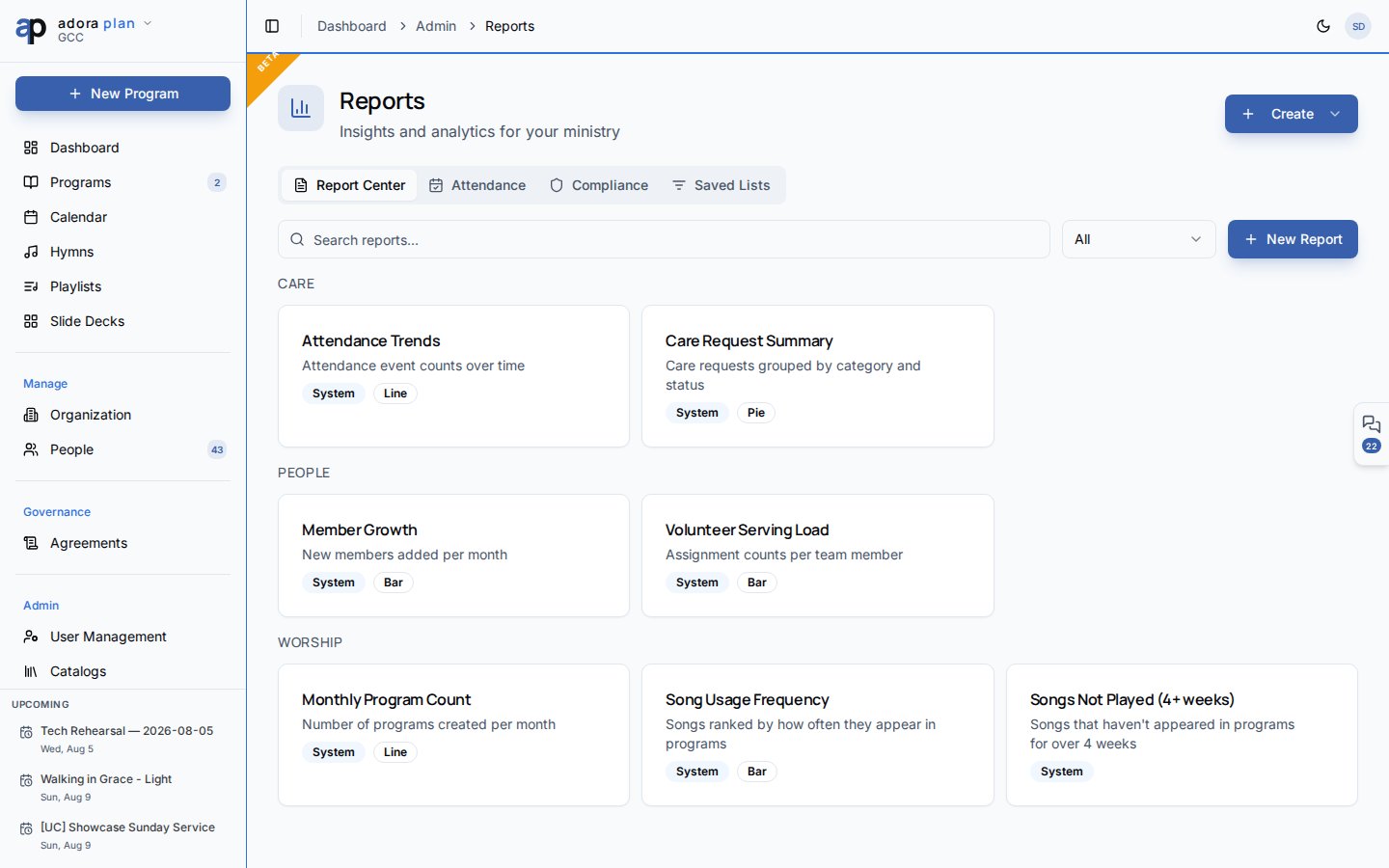
**Reports** gives church leaders insights into worship, people, and care — run built-in or custom reports, track attendance trends, and export data for planning.
 The **Reports** link in the Admin sidebar appears on **Pro** plans and above. If you do not see it, ask your church admin about upgrading, or open **Reports** directly at `/reports` when your plan includes advanced reports.
## Quick Start
1. Open **Admin** → **Reports** in the sidebar.
2. On **Report Center**, browse by category (Worship, People, Care, General).
3. Click **Run** on a report, enter any parameters, and view results.
4. Use **Export CSV** to download table data.
5. Switch to **Attendance** for guest and retention trends over time.
***
## How-to Guide
### Report Center
The default **Report Center** tab is your report library.
| Action | What it does |
| ------------- | ----------------------------------------------------- |
| **Run** | Open the report viewer with parameter prompts |
| **Edit** | Open the designer (custom reports only) |
| **Duplicate** | Copy a report as a starting point |
| **Delete** | Remove a custom report (system reports are protected) |
Use **Create** → **Build custom report** to open the designer. Define a name, category, SQL query template (with `{{parameter}}` placeholders), parameters, columns, and an optional chart (bar, line, pie).
This is different from a **Program Report** — the worship-service document you generate from **Programs** → open a program → **Report**. Reports here are analytics across your ministry data.
### Attendance tab
The **Reports** link in the Admin sidebar appears on **Pro** plans and above. If you do not see it, ask your church admin about upgrading, or open **Reports** directly at `/reports` when your plan includes advanced reports.
## Quick Start
1. Open **Admin** → **Reports** in the sidebar.
2. On **Report Center**, browse by category (Worship, People, Care, General).
3. Click **Run** on a report, enter any parameters, and view results.
4. Use **Export CSV** to download table data.
5. Switch to **Attendance** for guest and retention trends over time.
***
## How-to Guide
### Report Center
The default **Report Center** tab is your report library.
| Action | What it does |
| ------------- | ----------------------------------------------------- |
| **Run** | Open the report viewer with parameter prompts |
| **Edit** | Open the designer (custom reports only) |
| **Duplicate** | Copy a report as a starting point |
| **Delete** | Remove a custom report (system reports are protected) |
Use **Create** → **Build custom report** to open the designer. Define a name, category, SQL query template (with `{{parameter}}` placeholders), parameters, columns, and an optional chart (bar, line, pie).
This is different from a **Program Report** — the worship-service document you generate from **Programs** → open a program → **Report**. Reports here are analytics across your ministry data.
### Attendance tab
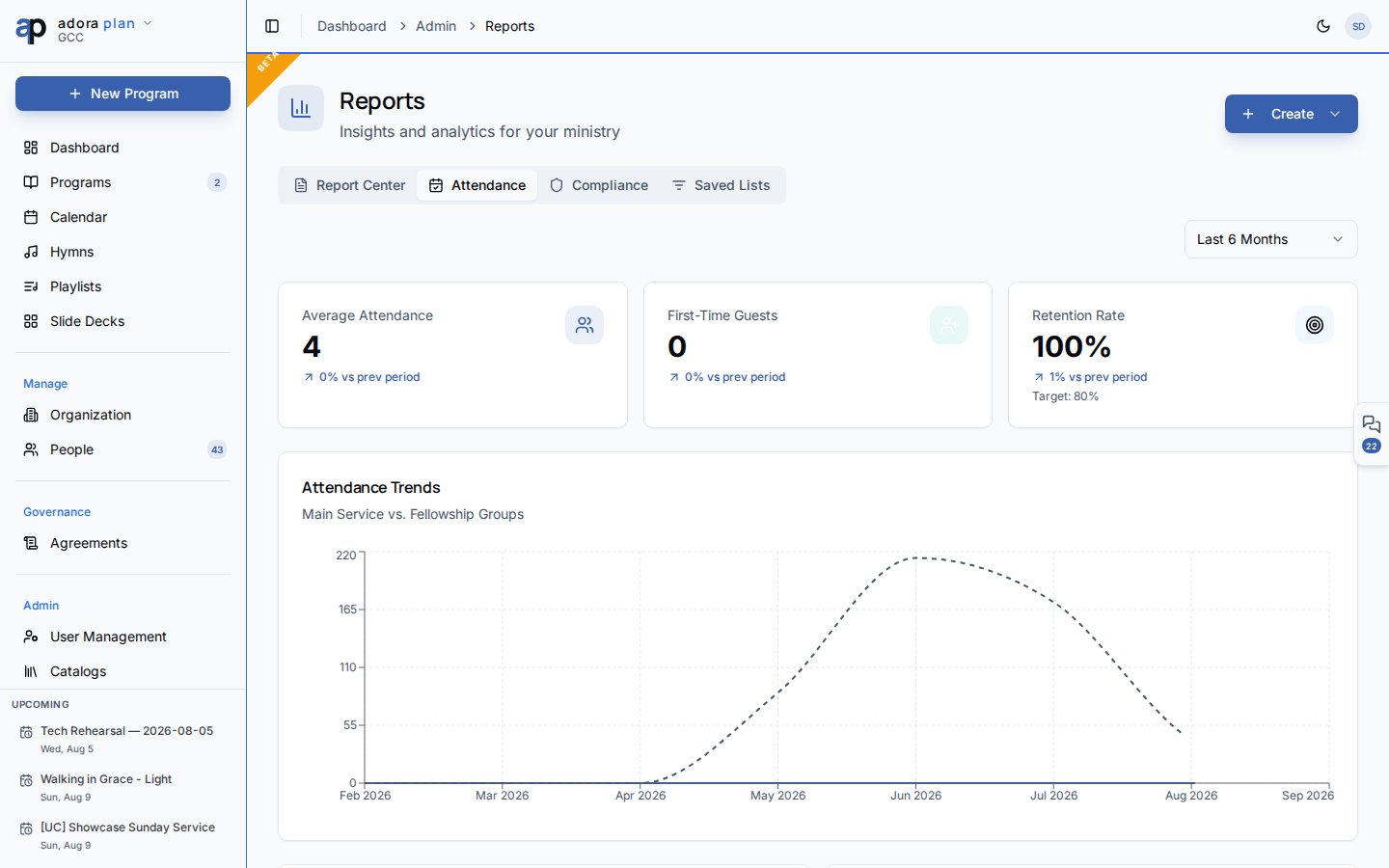 Track engagement over **3, 6, or 12 months**:
| Metric | Meaning |
| ---------------------- | ------------------------------------------ |
| **Average Attendance** | Typical weekly attendance |
| **First-Time Guests** | New visitors in the period |
| **Retention Rate** | Guest-to-member conversion vs. your target |
Charts include **Attendance Trends** (main service vs. fellowship groups), **Guest Sources**, and the **Guest Pipeline** funnel (visitor → member).
### Compliance tab
Review data stewardship for pastoral and member records:
* **PII Inventory** — counts of members, counselees, and guests with contact fields
* **Counseling Data Sensitivity** — cases, sessions, and confidential notes
* **Data Retention Warnings** — closed counseling journeys older than two years
* **Export CSV** — download the compliance summary
**Access Audit** is planned for a future release.
### Saved Lists tab
Build reusable **people segments** with rule-based filters (visibility: private or shared with your church).
1. Click **Create** → **New Saved List**, or use **Create** on the Saved Lists tab.
2. Name the list and set visibility.
3. Open a list to refine rules and preview matching people.
4. Use saved lists for outreach, follow-up, or reporting workflows.
***
## Related
At-a-glance metrics and upcoming programs.
The directory that feeds people-based reports and saved lists.
Configure the report preparation reminder threshold under **Programs**.
Advanced reports require a Pro plan or higher.
Track engagement over **3, 6, or 12 months**:
| Metric | Meaning |
| ---------------------- | ------------------------------------------ |
| **Average Attendance** | Typical weekly attendance |
| **First-Time Guests** | New visitors in the period |
| **Retention Rate** | Guest-to-member conversion vs. your target |
Charts include **Attendance Trends** (main service vs. fellowship groups), **Guest Sources**, and the **Guest Pipeline** funnel (visitor → member).
### Compliance tab
Review data stewardship for pastoral and member records:
* **PII Inventory** — counts of members, counselees, and guests with contact fields
* **Counseling Data Sensitivity** — cases, sessions, and confidential notes
* **Data Retention Warnings** — closed counseling journeys older than two years
* **Export CSV** — download the compliance summary
**Access Audit** is planned for a future release.
### Saved Lists tab
Build reusable **people segments** with rule-based filters (visibility: private or shared with your church).
1. Click **Create** → **New Saved List**, or use **Create** on the Saved Lists tab.
2. Name the list and set visibility.
3. Open a list to refine rules and preview matching people.
4. Use saved lists for outreach, follow-up, or reporting workflows.
***
## Related
At-a-glance metrics and upcoming programs.
The directory that feeds people-based reports and saved lists.
Configure the report preparation reminder threshold under **Programs**.
Advanced reports require a Pro plan or higher.