

Quick Start
- Sign in at app.adoraplan.com.
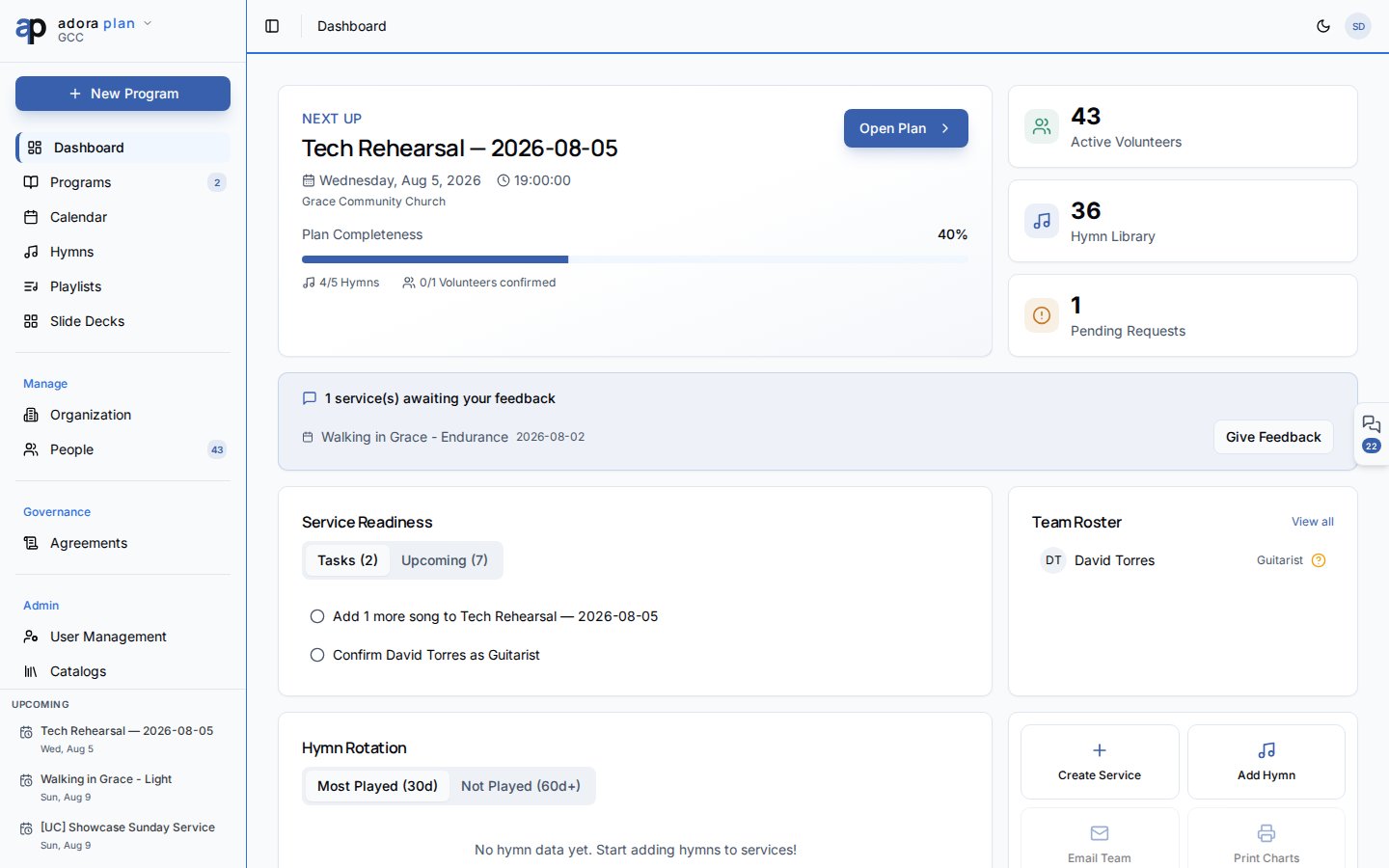
- You land on Dashboard — your planning home.
- Explore the sidebar: Dashboard, Programs, Calendar, Hymns, Playlists.
- Click Create Service to start your first Program.
- Open Hymns and add at least one song before building the Service Order.
How-to Guide
Tour the Dashboard
1
Next Up
The hero card shows your nearest Program. Use Open Plan or Create Service.
2
Metrics
Three cards summarize active volunteers, hymn library size, and pending requests.
3
Service Readiness
Switch between Tasks and Upcoming to see what still needs attention.
4
Quick Actions
Jump directly to Create Service or Add Hymn.
Learn the sidebar
Account settings (profile, notifications, billing) live under your avatar menu → Account.
Related
Plan Your First Service
Step-by-step first program walkthrough.
Programs
Full guide to the Service Order editor.
Help Center
Overview of AdoraPlan, AdoraCare, and AdoraCounsel.